一、创建集合
创建集合的最常用方法是使用标准库函数 listOf<T>()、setOf<T>()、mutableListOf<T>()、mutableSetOf<T>()。 如果以逗号分隔的集合元素列表作为参数,编译器会自动检测元素类型。创建空集合时,须明确指定类型。
val numbersSet = setOf("one", "two", "three", "four") val emptySet = mutableSetOf<String>() Map 也有这样的函数 mapOf()与 mutableMapOf()。映射的键和值作为 Pair 对象传递(通常使用中缀函数 to 创建)。
val numbersMap = mapOf("key1" to 1, "key2" to 2, "key3" to 3, "key4" to 1) 注意,to 符号创建了一个短时存活的 Pair 对象,因此建议仅在性能不重要时才使用它。为避免过多的内存使用,请使用其他方法。例如,可以创建可写 Map 并使用写入操作填充它。 apply()函数可以帮助保持初始化流畅。
val numbersMap = mutableMapOf<String, String>().apply { this["one"] = "1"; this["two"] = "2" } 还有用于创建没有任何元素的集合的函数:emptyList()、emptySet()与 emptyMap()。 创建空集合时,应指定集合将包含的元素类型。
val empty = emptyList<String>() 具体类型构造函数:
val linkedList = LinkedList<String>(listOf("one", "two", "three")) val presizedSet = HashSet<Int>(32) 复制:
在特定时刻通过集合复制函数,例如toList()、toMutableList()、toSet()等等。创建了集合的快照。 结果是创建了一个具有相同元素的新集合 如果在源集合中添加或删除元素,则不会影响副本。副本也可以独立于源集合进行更改。
这些函数还可用于将集合转换为其他类型,例如根据 List 构建 Set:
val sourceList = mutableListOf(1, 2, 3) val copySet = sourceList.toMutableSet() copySet.add(3) copySet.add(4) println(copySet) 过滤:
val numbers = listOf("one", "two", "three", "four") val longerThan3 = numbers.filter { it.length > 3 } println(longerThan3) 二、迭代器
通过迭代器遍历集合:
val numbers = listOf("one", "two", "three", "four") val numbersIterator = numbers.iterator() while (numbersIterator.hasNext()) { println(numbersIterator.next()) } 遍历 Iterable 集合的另一种方法是众所周知的 for 循环:
val numbers = listOf("one", "two", "three", "four") for (item in numbers) { println(item) } 通过forEach遍历:
val numbers = listOf("one", "two", "three", "four") numbers.forEach { println(it) } List 迭代器:
对于列表,有一个特殊的迭代器实现: ListIterator它支持列表双向迭代:正向与反向。 反向迭代由 hasPrevious()和 previous()函数实现。 此外, ListIterator 通过 nextIndex() 与 previousIndex()函数提供有关元素索引的信息。
val numbers = listOf("one", "two", "three", "four") val listIterator = numbers.listIterator() while (listIterator.hasNext()) listIterator.next() println("Iterating backwards:") while (listIterator.hasPrevious()) { print("Index: ${listIterator.previousIndex()}") println(", value: ${listIterator.previous()}") } 具有双向迭代的能力意味着 ListIterator 在到达最后一个元素后仍可以使用。
可变迭代器:
为了迭代可变集合,于是有了 MutableIterator来扩展 Iterator 使其具有元素删除函数 remove()。因此,可以在迭代时从集合中删除元素。
val numbers = mutableListOf("one", "two", "three", "four") val mutableIterator = numbers.iterator() mutableIterator.next() mutableIterator.remove() println("After removal: $numbers") 除了删除元素, MutableListIterator还可以在迭代列表时插入和替换元素。
val numbers = mutableListOf("one", "four", "four") val mutableListIterator = numbers.listIterator() mutableListIterator.next() mutableListIterator.add("two") mutableListIterator.next() mutableListIterator.set("three") println(numbers) 三、序列
除了集合之外,Kotlin 标准库还包含另一种容器类型——序列(Sequence<T>)。 序列提供与 Iterable 相同的函数。
创建序列:
val numbersSequence = sequenceOf("four", "three", "two", "one") 将 Iterable 转成 Sequence:
val numbers = listOf("one", "two", "three", "four") val numbersSequence = numbers.asSequence() 基于函数创建无限序列:
val oddNumbers = generateSequence(1) { it + 2 } // 创建无限序列 println(oddNumbers.take(6).toList()) // 取前6个元素,返回长度为6的序列 基于函数创建有限序列:
val oddNumbersLessThan10 = generateSequence(1) { if (it + 2 < 10) it + 2 else null } println(oddNumbersLessThan10.count()) Iterable 与 Sequence 之间的区别?
Iterable:
val words = "The quick brown fox jumps over the lazy dog".split(" ") val lengthsList = words.filter { println("filter: $it"); it.length > 3 } .map { println("length: ${it.length}"); it.length } .take(4) 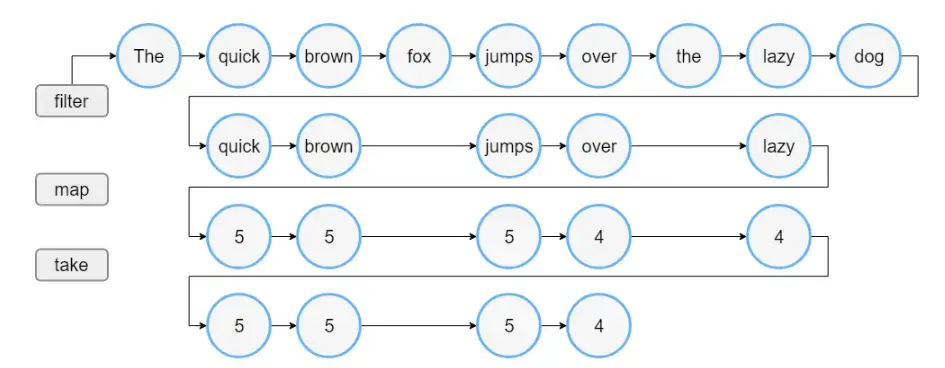
Sequence:
val words = "The quick brown fox jumps over the lazy dog".split(" ") // 将列表转换为序列 val wordsSequence = words.asSequence() val lengthsSequence = wordsSequence.filter { println("filter: $it"); it.length > 3 } .map { println("length: ${it.length}"); it.length } .take(4) 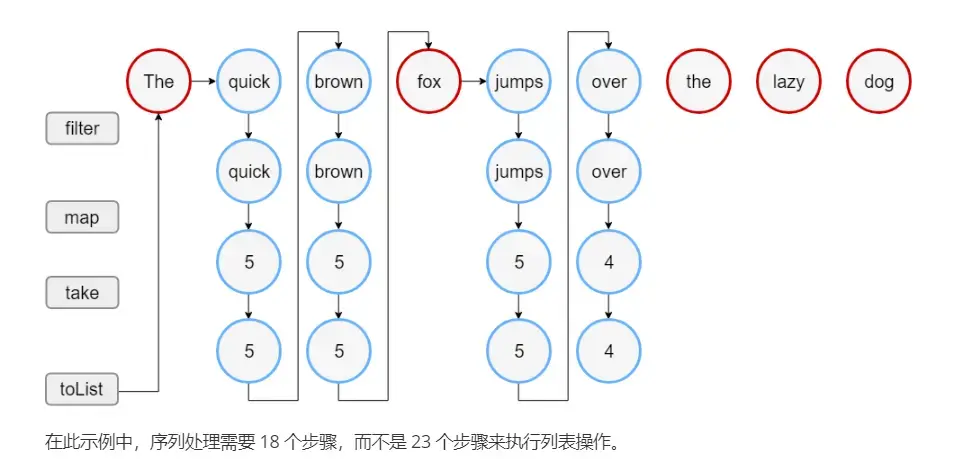
四、集合转换
【1】使用映射(map)转换:
val numbers = setOf(1, 2, 3) println(numbers.map { it * 3 }) println(numbers.mapIndexed { idx, value -> value * idx }) 输出结果:
[3, 6, 9] [0, 2, 6] 转换过程中可能为null,为了防止null值,可用 mapNotNull() 函数取代 map() 或 mapIndexedNotNull() 取代 mapIndexed(),来从结果集中过滤掉 null 值。
val numbers = setOf(1, 2, 3) println(numbers.mapNotNull { if ( it == 2) null else it * 3 }) println(numbers.mapIndexedNotNull { idx, value -> if (idx == 0) null else value * idx }) 输出结果:
[3, 9] [2, 6] 映射转换时,有两个选择:转换键,使值保持不变,反之亦然。
要将指定转换应用于键,请使用 mapKeys();反过来,mapValues() 转换值。 这两个函数都使用将映射条目作为参数的转换,因此可以操作其键与值。
val numbersMap = mapOf("key1" to 1, "key2" to 2, "key3" to 3, "key11" to 11) println(numbersMap.mapKeys { it.key.toUpperCase() }) println(numbersMap.mapValues { it.value + it.key.length }) 输出结果:
{KEY1=1, KEY2=2, KEY3=3, KEY11=11} {key1=5, key2=6, key3=7, key11=16} 【2】使用合拢(zip)转换
合拢转换是根据两个集合中具有相同位置的元素构建配对。
val colors = listOf("red", "brown", "grey") val animals = listOf("fox", "bear", "wolf") println(colors zip animals) // 方式一 val twoAnimals = listOf("fox", "bear") println(colors.zip(twoAnimals)) // 方式二 输出结果:
[(red, fox), (brown, bear), (grey, wolf)] [(red, fox), (brown, bear)] 使用带有两个参数的转换函数来调用 zip():
val colors = listOf("red", "brown", "grey") val animals = listOf("fox", "bear", "wolf") println(colors.zip(animals) { color, animal -> "The ${animal.capitalize()} is $color"}) 输出结果:
[The Fox is red, The Bear is brown, The Wolf is grey] 使用 unzipping 反向转换:
val numberPairs = listOf("one" to 1, "two" to 2, "three" to 3, "four" to 4) println(numberPairs.unzip()) 输出结果:
([one, two, three, four], [1, 2, 3, 4]) 【3】使用关联(associate)转换
associateWith(原始集合是键) :
val numbers = listOf("one", "two", "three", "four") // 键 println(numbers.associateWith { it.length }) 输出结果:
{one=3, two=3, three=5, four=4} associateBy (原始集合是值):
val numbers = listOf("one", "two", "three", "four") // 值 println(numbers.associateBy { it.first().toUpperCase() }) println(numbers.associateBy(keySelector = { it.first().toUpperCase() }, valueTransform = { it.length })) 输出结果:
{O=one, T=three, F=four} {O=3, T=5, F=4} associate (目标集合的键和值都是通过原始集合生成的):
data class FullName (val firstName: String, val lastName: String) fun parseFullName(fullName: String): FullName { val nameParts = fullName.split(" ") if (nameParts.size == 2) { return FullName(nameParts[0], nameParts[1]) } else throw Exception("Wrong name format") } val names = listOf("Alice Adams", "Brian Brown", "Clara Campbell") println(names.associate { name -> parseFullName(name).let { it.lastName to it.firstName } }) 输出结果:
{Adams=Alice, Brown=Brian, Campbell=Clara} 【4】使用打平(flat)转换(将一个集合转换成另一个集合)
使用 flatten 将嵌套集合转成非嵌套:
val numberSets = listOf(setOf(1, 2, 3), setOf(4, 5, 6), setOf(1, 2)) println(numberSets.flatten()) 输出结果:
[1, 2, 3, 4, 5, 6, 1, 2] 合并两字节数组:
val array1 = UByteArray(1) array1[0] = 0x01u val array2 = UByteArray(1) array2[0] = 0x02u val array3 = listOf(array1, array2).flatten().toUByteArray().asByteArray() for (i in array3.indices) { print(array3[i].toString() + " ") } 使用flatMap处理嵌套集合:
data class StringContainer(val values: List<String>) val containers = listOf( StringContainer(listOf("one", "two", "three")), StringContainer(listOf("four", "five", "six")), StringContainer(listOf("seven", "eight")) ) println(containers.flatMap { it.values }) 输出结果:
[one, two, three, four, five, six, seven, eight] 五、过滤
根据值过滤:
val numbers = listOf("one", "two", "three", "four") val longerThan3 = numbers.filter { it.length > 3 } println(longerThan3) val numbersMap = mapOf("key1" to 1, "key2" to 2, "key3" to 3, "key11" to 11) val filteredMap = numbersMap.filter { (key, value) -> key.endsWith("1") && value > 10} println(filteredMap) 输出结果:
[three, four] {key11=11} 根据索引和值来过滤:
val numbers = listOf("one", "two", "three", "four") val filteredIdx = numbers.filterIndexed { index, s -> (index != 0) && (s.length < 5) } println(filteredIdx) 输出结果:
[two, four] 根据否定条件来过滤集合:
val numbers = listOf("one", "two", "three", "four") val filteredNot = numbers.filterNot { it.length <= 3 } println(filteredNot) 输出结果:
[three, four] 根据指定类型过滤:
val numbers = listOf(null, 1, "two", 3.0, "four") println("All String elements in upper case:") numbers.filterIsInstance<String>().forEach { println(it.toUpperCase()) } 输出结果:
All String elements in upper case: TWO FOUR 过滤所有非空值:
val numbers = listOf(null, "one", "two", null) numbers.filterNotNull().forEach { println(it) } 输出结果:
one two 通过一个谓词过滤集合并且将不匹配的元素存放在一个单独的列表中:
val numbers = listOf("one", "two", "three", "four") val (match, rest) = numbers.partition { it.length > 3 } println(match) println(rest) 输出结果:
[three, four] [one, two] 检验谓词:
val numbers = listOf("one", "two", "three", "four") println(numbers.any { it.endsWith("e") }) // 至少有一个元素匹配给定谓词 println(numbers.none { it.endsWith("a") }) // 没有元素与给定谓词匹配 println(numbers.all { it.endsWith("e") }) // 所有元素都匹配给定谓词 六、加减操作符
在 Kotlin 中,为集合定义了 plus (+) 和 minus(-) 操作符。它们均为重载操作符, plus对应着+,minus对应着-。
val numbers = listOf("one", "two", "three", "four") val plusList = numbers + "five" val minusList = numbers - listOf("three", "four") println(plusList) println(minusList) 输出结果:
[one, two, three, four, five] [one, two] 七、分组
基本函数 groupBy() 使用一个 lambda 函数并返回一个 Map,在此 Map 中,每个键都是 lambda 结果,而对应的值是返回此结果的元素 List。
按大写首字母分组:
val numbers = listOf("one", "two", "three", "four", "five") println(numbers.groupBy { it.first().toUpperCase() }) 输出结果:
{O=[one], T=[two, three], F=[four, five]} 按首字母分组,并将值转成大写:
val numbers = listOf("one", "two", "three", "four", "five") println(numbers.groupBy(keySelector = { it.first() }, valueTransform = { it.toUpperCase() })) 输出结果:
{o=[ONE], t=[TWO, THREE], f=[FOUR, FIVE]} 如果要多具体的元素进行分组,可以使用groupingBy:
val numbers = listOf("one", "two", "three", "four", "five", "six") println(numbers.groupingBy { it.first() }.eachCount()) 输出结果:
{o=1, t=2, f=2, s=1} groupingBy 返回Grouping类型,Grouping有 fold 和 reduce 函数。
fold 和 reduce:
它们的区别是?
reduce的返回值类型必须和集合的元素类型相符。 fold的返回值类型则不受约束。 通过 reduce 实现元素求和:
val numbers = listOf(2, 5, 1) val result = numbers.reduce { a: Int, b: Int -> a + b } println("reduceResult=$result") 输出结果:
reduceResult=8 通过 fold 将集合拼接成字符串:
val numbers = listOf(2, 5, 1) val result = numbers.fold(StringBuilder()) { str: StringBuilder, i: Int -> str.append(i).append(" ") } println("foldResult=$result") 输出结果:
foldResult=2 5 1 --------------------------- fold : 合拢,折叠 reduce : 压缩 两个函数都是对集合的遍历,只是遍历完成之后能得到一个结果。 折叠和压缩的意思,可以理解为,将集合折叠成一个新的对象【对象的类型,可以与集合元素的类型无关】 或者压缩成一个值【类型必须和集合元素的类型一致】。 八、取集合中的一部分
【1】使用 Slice 返回具有给定索引的集合元素列表
val numbers = listOf("one", "two", "three", "four", "five", "six") println(numbers.slice(1..3)) println(numbers.slice(0..4 step 2)) println(numbers.slice(setOf(3, 5, 0))) 输出结果:
[two, three, four] [one, three, five] [four, six, one] 【2】使用Take 与 drop
take:从头开始获取指定数量的元素
drop:从头开始去除指定数量的元素
takeLast:从尾开始获取指定数量的元素
dropLast:从尾开始去除指定数量的元素
val numbers = listOf("one", "two", "three", "four", "five", "six") println(numbers.take(3)) println(numbers.takeLast(3)) println(numbers.drop(1)) println(numbers.dropLast(5)) 输出结果:
[one, two, three] [four, five, six] [two, three, four, five, six] [one] 使用谓词来定义要获取或去除的元素的数量(takeWhile 、takeLastWhile、dropWhile、dropLastWhile):
val numbers = listOf("one", "two", "three", "four", "five", "six") println(numbers.takeWhile { !it.startsWith('f') }) println(numbers.takeLastWhile { it != "three" }) println(numbers.dropWhile { it.length == 3 }) println(numbers.dropLastWhile { it.contains('i') }) 输出结果:
[one, two, three] [four, five, six] [three, four, five, six] [one, two, three, four] 【3】使用 chunked 将集合分解成给定大小的"块"
val numbers = (0..13).toList() println(numbers.chunked(3)) 输出结果:
[[0, 1, 2], [3, 4, 5], [6, 7, 8], [9, 10, 11], [12, 13]] 还可以返回块的转换:
val numbers = (0..13).toList() println(numbers.chunked(3) { it.sum() }) // `it` 为原始集合的一个块 输出结果:
[3, 12, 21, 30, 25] 【4】使用 Windowed 检索给定大小的集合元素中所有可能区间
val numbers = listOf("one", "two", "three", "four", "five") println(numbers.windowed(3)) 输出结果:
[[one, two, three], [two, three, four], [three, four, five]] windowed()有两个参数:step 、partialWindows
step:间隔
partialWindows:是否包含较小的窗口
val numbers = (1..10).toList() println(numbers.windowed(3, step = 2, partialWindows = true)) println(numbers.windowed(3, step = 2, partialWindows = false)) 输出结果:
[[1, 2, 3], [3, 4, 5], [5, 6, 7], [7, 8, 9], [9, 10]] [[1, 2, 3], [3, 4, 5], [5, 6, 7], [7, 8, 9]] 还可以返回块的转换:
val numbers = (1..10).toList() println(numbers.windowed(3) { it.sum() }) 输出结果:
[6, 9, 12, 15, 18, 21, 24, 27] 【5】使用 zipWithNext 创建接收器集合的相邻元素对
val numbers = listOf("one", "two", "three", "four", "five") println(numbers.zipWithNext()) println(numbers.zipWithNext() { s1, s2 -> s1.length > s2.length}) 输出结果:
[(one, two), (two, three), (three, four), (four, five)] [false, false, true, false] 九、取单个元素
【1】按位置取
val numbers = linkedSetOf("one", "two", "three", "four", "five") println(numbers.elementAt(3)) // 相当于numbers[3] 输出结果:
four 排序或获取单个元素:
val numbersSortedSet = sortedSetOf("one", "two", "three", "four") println(numbersSortedSet) println(numbersSortedSet.elementAt(0)) // 相当于numbers[0] 输出结果:
[four, one, three, two] four 使用 first 和 last 获取单个元素:
val numbers = listOf("one", "two", "three", "four", "five") println(numbers.first()) println(numbers.last()) 输出结果:
one five 具有安全性质获取单个元素(防止空指针和角标越界引起的崩溃):
val numbers = listOf("one", "two", "three", "four", "five") println(numbers.elementAtOrNull(5)) // 相当于 numbers.getOrNull(5) println(numbers.elementAtOrElse(5) { index -> "The value for index $index is undefined"}) // 相当于 numbers.getOrElse() 输出结果:
null The value for index 5 is undefined 【2】按条件取
使用 first 、last 按条件获取:
val numbers = listOf("one", "two", "three", "four", "five", "six") println(numbers.first { it.length > 3 }) println(numbers.last { it.startsWith("f") }) 输出结果:
three five 为了避免空指针导致的异常,可以使用 firstOrNull、 lastOrNull 代替:
val numbers = listOf("one", "two", "three", "four", "five", "six") println(numbers.firstOrNull { it.length > 6 }) println(numbers.lastOrNull { it.length > 6 }) 输出结果:
null null 使用 find 和 findLast 按条件获取:
val numbers = listOf(1, 2, 3, 4) println(numbers.find { it % 2 == 0 }) println(numbers.findLast { it % 2 == 0 }) 输出结果:
2 4 【3】随机取元素
val numbers = listOf(1, 2, 3, 4) println(numbers.random()) 【4】检测存在与否
val numbers = listOf("one", "two", "three", "four", "five", "six") println(numbers.contains("four")) println("zero" in numbers) println(numbers.containsAll(listOf("four", "two"))) println(numbers.containsAll(listOf("one", "zero"))) 输出结果:
true false true false 【5】检查集合中是否为空或非空
val numbers = listOf("one", "two", "three", "four", "five", "six") println(numbers.isEmpty()) println(numbers.isNotEmpty()) val empty = emptyList<String>() println(empty.isEmpty()) println(empty.isNotEmpty()) 输出结果:
false true true false 十、排序
【1】实现 Comparable 接口自定义比较规则,并排序:
class Version(val major: Int, val minor: Int): Comparable<Version> { override fun compareTo(other: Version): Int { if (this.major != other.major) { return this.major - other.major } else if (this.minor != other.minor) { return this.minor - other.minor } else return 0 } override fun toString(): String { return "($major,$minor)" } } var list = arrayListOf(Version(1, 2), Version(1, 3), Version(2, 0), Version(1, 5)) list.sort() println(list) 输出结果:
[(1,2), (1,3), (1,5), (2,0)] 【2】还可以使用 Comparator 对象排序:
val versionComparator = Comparator<Version> { version1: Version, version2: Version -> if (version1.major != version2.major) { version1.major - version2.major } else if (version1.minor != version2.minor) { version1.minor - version2.minor } else 0} var list = arrayListOf(Version(1, 2), Version(1, 3), Version(2, 0), Version(1, 5)) list.sortWith(versionComparator) println(list) 输出结果:
[(1,2), (1,3), (1,5), (2,0)] 【3】自然排序
sorted(): 升序排序
sortedDescending():降序排序
val numbers = listOf("one", "two", "three", "four") println("Sorted ascending: ${numbers.sorted()}") println("Sorted descending: ${numbers.sortedDescending()}") 输出结果:
Sorted ascending: [four, one, three, two] Sorted descending: [two, three, one, four] 集合的元素都是字符串,字符串的自然顺序是比较字符串的大小。
【4】使用 sortedBy 自定义一个自然顺序
val numbers = listOf("one", "two", "three", "four") val sortedNumbers = numbers.sortedBy { it.length } println("Sorted by length ascending: $sortedNumbers") val sortedByLast = numbers.sortedByDescending { it.last() } println("Sorted by the last letter descending: $sortedByLast") 输出结果:
Sorted by length ascending: [one, two, four, three] Sorted by the last letter descending: [four, two, one, three] 【5】倒序排序
val numbers = listOf("one", "two", "three", "four") println(numbers.reversed()) 输出结果:
[four, three, two, one] 【6】随机顺序
val numbers = listOf("one", "two", "three", "four") println(numbers.shuffled()) 十一、集合聚合操作
集合聚合操作:基于集合内容返回单个值的操作
使用 count、max、min、average、sum函数:
val numbers = listOf(6, 42, 10, 4) println("Count: ${numbers.count()}") println("Max: ${numbers.max()}") println("Min: ${numbers.min()}") println("Average: ${numbers.average()}") println("Sum: ${numbers.sum()}") 输出结果:
Count: 4 Max: 42 Min: 4 Average: 15.5 Sum: 62 使用 minBy 、maxBy 、maxWith、minWith:
val numbers = listOf(5, 42, 10, 4) val minRemainder = numbers.minBy { it % 3 } println(minRemainder) val maxRemainder = numbers.maxBy { it % 3 } println(maxRemainder) val strings = listOf("one", "two", "three", "four") val maxLengthString = strings.maxWith(compareBy { it.length }) println(maxLengthString) val minLengthString = strings.minWith(compareBy { it.length }) println(minLengthString) 输出结果:
42 5 three one 使用高级求和函数sumBy 、sumByDouble:
val numbers = listOf(5, 42, 10, 4) println(numbers.sumBy { it * 2 }) println(numbers.sumByDouble { it.toDouble() / 2 }) 输出结果:
122 30.5 十二、集合写操作
【1】添加元素
add:
val numbers = mutableListOf(1, 2, 3, 4) numbers.add(5) println(numbers) 输出结果:
[1, 2, 3, 4, 5] addAll:
val numbers = mutableListOf(1, 2, 5, 6) numbers.addAll(arrayOf(7, 8)) println(numbers) numbers.addAll(2, setOf(3, 4)) println(numbers) 输出结果:
[1, 2, 5, 6, 7, 8] [1, 2, 3, 4, 5, 6, 7, 8] 使用 plus 运算符 (-) 和 plusAssign (+=) 添加元素:
val numbers = mutableListOf("one", "two") numbers += "three" println(numbers) numbers += listOf("four", "five") println(numbers) 输出结果:
[one, two, three] [one, two, three, four, five] 【2】删除元素
val numbers = mutableListOf(1, 2, 3, 4, 3) numbers.remove(3) // 删除 numbers.retainAll { it >= 3 } // 保留 numbers.clear() // 清空 val numbersSet = mutableSetOf("one", "two", "three", "four") numbersSet.removeAll(setOf("one", "two")) // 删除所有 十三、List相关操作
【1】按索引取元素
val numbers = listOf(1, 2, 3, 4) println(numbers.get(0)) println(numbers[0]) println(numbers.getOrNull(5)) println(numbers.getOrElse(5, {it})) 【2】取列表的一部分
val numbers = (0..13).toList() println(numbers.subList(3, 6)) 输出结果:
[3, 4, 5] 【3】查找元素位置
线性查找:
val numbers = listOf(1, 2, 3, 4, 2, 5) println(numbers.indexOf(2)) println(numbers.lastIndexOf(2)) val numbers = mutableListOf(1, 2, 3, 4) println(numbers.indexOfFirst { it > 2}) println(numbers.indexOfLast { it % 2 == 1}) 在有序列表中二分查找:
val numbers = mutableListOf("one", "two", "three", "four") numbers.sort() println(numbers) println(numbers.binarySearch("two")) println(numbers.binarySearch("z")) println(numbers.binarySearch("two", 0, 2)) Comparator 二分搜索:
data class Product(val name: String, val price: Double) fun main() { val productList = listOf( Product("WebStorm", 49.0), Product("AppCode", 99.0), Product("DotTrace", 129.0), Product("ReSharper", 149.0)) println(productList.binarySearch(Product("AppCode", 99.0), compareBy<Product> { it.price }.thenBy { it.name })) } 使用 String.CASE_INSENSITIVE_ORDER:
val colors = listOf("Blue", "green", "ORANGE", "Red", "yellow") println(colors.binarySearch("RED", String.CASE_INSENSITIVE_ORDER)) 比较函数二分搜索:
data class Product(val name: String, val price: Double) fun priceComparison(product: Product, price: Double) = sign(product.price - price).toInt() fun main() { val productList = listOf( Product("WebStorm", 49.0), Product("AppCode", 99.0), Product("DotTrace", 129.0), Product("ReSharper", 149.0)) println(productList.binarySearch { priceComparison(it, 99.0) }) } 【4】添加
val numbers = mutableListOf("one", "five", "six") numbers.add(1, "two") numbers.addAll(2, listOf("three", "four")) println(numbers) 【5】更新
val numbers = mutableListOf("one", "five", "three") numbers[1] = "two" println(numbers) 【6】替换
val numbers = mutableListOf(1, 2, 3, 4) numbers.fill(3) // 将所有元素替换成指定值 println(numbers) 输出结果:
[3, 3, 3, 3] 【7】删除
val numbers = mutableListOf(1, 2, 3, 4, 3) numbers.removeAt(1) println(numbers) val numbers = mutableListOf(1, 2, 3, 4, 3) numbers.removeFirst() numbers.removeLast() println(numbers) val empty = mutableListOf<Int>() // empty.removeFirst() // NoSuchElementException: List is empty. empty.removeFirstOrNull() //null 【8】排序
val numbers = mutableListOf("one", "two", "three", "four") numbers.sort() println("Sort into ascending: $numbers") numbers.sortDescending() println("Sort into descending: $numbers") numbers.sortBy { it.length } println("Sort into ascending by length: $numbers") numbers.sortByDescending { it.last() } println("Sort into descending by the last letter: $numbers") numbers.sortWith(compareBy<String> { it.length }.thenBy { it }) println("Sort by Comparator: $numbers") numbers.shuffle() // 随机 println("Shuffle: $numbers") numbers.reverse() // 反转 println("Reverse: $numbers") 输出结果:
Sort into ascending: [four, one, three, two] Sort into descending: [two, three, one, four] Sort into ascending by length: [two, one, four, three] Sort into descending by the last letter: [four, two, one, three] Sort by Comparator: [one, two, four, three] Shuffle: [two, one, three, four] Reverse: [four, three, one, two] 十四、Set相关操作
val numbers = setOf("one", "two", "three") println(numbers union setOf("four", "five")) // 并集 println(setOf("four", "five") union numbers) // 并集 println(numbers intersect setOf("two", "one")) // 交集 println(numbers subtract setOf("three", "four")) // 差集 println(numbers subtract setOf("four", "three")) // 差集 输出结果:
[one, two, three, four, five] [four, five, one, two, three] [one, two] [one, two] [one, two] 十五、Map相关操作
【1】取键与值
val numbersMap = mapOf("one" to 1, "two" to 2, "three" to 3) println(numbersMap.get("one")) println(numbersMap["one"]) numbersMap.getOrElse("four") {"错误"} println(numbersMap.getOrDefault("four", 10)) val numbersMap = mapOf("one" to 1, "two" to 2, "three" to 3) println(numbersMap.keys) println(numbersMap.values) 【2】过滤
val numbersMap = mapOf("key1" to 1, "key2" to 2, "key3" to 3, "key11" to 11) val filteredMap = numbersMap.filter { (key, value) -> key.endsWith("1") && value > 10} println(filteredMap) val numbersMap = mapOf("key1" to 1, "key2" to 2, "key3" to 3, "key11" to 11) val filteredKeysMap = numbersMap.filterKeys { it.endsWith("1") } val filteredValuesMap = numbersMap.filterValues { it < 10 } println(filteredKeysMap) println(filteredValuesMap) 【3】plus 与 minus 操作
val numbersMap = mapOf("one" to 1, "two" to 2, "three" to 3) println(numbersMap + Pair("four", 4)) println(numbersMap + Pair("one", 10)) println(numbersMap + mapOf("five" to 5, "one" to 11)) val numbersMap = mapOf("one" to 1, "two" to 2, "three" to 3) println(numbersMap - "one") println(numbersMap - listOf("two", "four")) 【4】添加与更新
val numbersMap = mutableMapOf("one" to 1, "two" to 2) numbersMap.put("three", 3) println(numbersMap) val numbersMap = mutableMapOf("one" to 1, "two" to 2, "three" to 3) numbersMap.putAll(setOf("four" to 4, "five" to 5)) println(numbersMap) 【5】plusAssign(+=) 操作符
val numbersMap = mutableMapOf("one" to 1, "two" to 2) numbersMap["three"] = 3 // 调用 numbersMap.set("three", 3) numbersMap += mapOf("four" to 4, "five" to 5) println(numbersMap) 【6】删除
val numbersMap = mutableMapOf("one" to 1, "two" to 2, "three" to 3) numbersMap.remove("one") println(numbersMap) numbersMap.remove("three", 4) //不会删除任何条目 println(numbersMap) val numbersMap = mutableMapOf("one" to 1, "two" to 2, "three" to 3, "threeAgain" to 3) numbersMap.keys.remove("one") println(numbersMap) numbersMap.values.remove(3) println(numbersMap) 使用 minusAssign(-=) 操作符:
val numbersMap = mutableMapOf("one" to 1, "two" to 2, "three" to 3) numbersMap -= "two" println(numbersMap) numbersMap -= "five" //不会删除任何条目 println(numbersMap) [本章完...]